Episode - 6
Watch DMGA 006 in Entertainment | View More Free Videos Online at Veoh.com
Friday, June 8, 2012

Wednesday, June 6, 2012
Daemang (The Great Ambition / A Great Hope)

Synopsis
A woman left her newborn child at the doorsteps of a rich merchant, stating that the child was of the merchant's blood. Eighteen years later, the small child grew up to be Park Jae Young (Jang Hyuk), the younger son of PHC. He was a warm-hearted person though a bit naive in the ways of the world and was often being used by his scheming elder brother Park Si Young (Han Jae Suk)who was a person totally lacking in morals. PSY lived to satisfy his own ambition and not concerned whom he hurt along the way. Not knowing Yoon Yeo Jin (Lee Yo Won) was of the aristocratic class, PJY had loved her since they were small children. YYJ also loved him and tried to ignore her higher class status. When PJY ran away from home after finding out that his father and elder brother killed the family of a govt official for refusing his bribe and tricked his friends into admitting the crime, he encountered Choi Dong Hee (Son Yeh Jin) and her merchant father. Through these people, he also got to meet the mother he had never seen who by this time has become a powerful political lobbyist. Into the mix, the fight over who would be the next emporer was getting intense with the 2 brothers supporting different sides. Will good trimph over evil? More details at Drama Wiki
A woman left her newborn child at the doorsteps of a rich merchant, stating that the child was of the merchant's blood. Eighteen years later, the small child grew up to be Park Jae Young (Jang Hyuk), the younger son of PHC. He was a warm-hearted person though a bit naive in the ways of the world and was often being used by his scheming elder brother Park Si Young (Han Jae Suk)who was a person totally lacking in morals. PSY lived to satisfy his own ambition and not concerned whom he hurt along the way. Not knowing Yoon Yeo Jin (Lee Yo Won) was of the aristocratic class, PJY had loved her since they were small children. YYJ also loved him and tried to ignore her higher class status. When PJY ran away from home after finding out that his father and elder brother killed the family of a govt official for refusing his bribe and tricked his friends into admitting the crime, he encountered Choi Dong Hee (Son Yeh Jin) and her merchant father. Through these people, he also got to meet the mother he had never seen who by this time has become a powerful political lobbyist. Into the mix, the fight over who would be the next emporer was getting intense with the 2 brothers supporting different sides. Will good trimph over evil? More details at Drama Wiki
- Title: 大望 / 대망 / Dae-mang
- Also known as: The Great Ambition / A Great Hope
- Genre: Historical drama
- Episodes: 26
- Broadcast network: SBS
- Broadcast period: 2002-Oct-12 to 2003-Jan-05
- Air time: Saturday & Sunday 21:45-22:50
Daemang - Episode-01
Watch DMGA 001 in Entertainment | View More Free Videos Online at Veoh.com
Daemang - Episode-02
Watch DMGA 002 in Entertainment | View More Free Videos Online at Veoh.com
Daemang - Episode-03
Watch DMGA 003 in Entertainment | View More Free Videos Online at Veoh.com
Watch DMGA 003 in Entertainment | View More Free Videos Online at Veoh.com
Daemang - Episode-04
Watch DMGA 004 in Entertainment | View More Free Videos Online at Veoh.com
to be continued...
Sunday, May 13, 2012
Happy Mother's Day!!!
I L❤VE you M❤M!!!, not only "Toady" is special but also "Everyday" is very special for my entire life.
Thank you M❤M... "Happy Mother's Day!!!"
Thank you M❤M... "Happy Mother's Day!!!"
Tuesday, September 13, 2011
How to Burn ISO Disk Image in Mac OS X using build-in Disk Utility...
If you want to Burn ISO Disk Image in your mac and don’t have other third party bunner as like Roxio toast, Express Burn Plus and NTI Dragon Burn. I hope you would love mac OS X build-in burner Disk Utility.
So, here you go :)
Step 1. Click -> Go -> Utilities (from finder menu)
Step 1. Click -> Go -> Utilities (from finder menu)

Setp 2. Clik -> Disk Utility


Step 3. Clik -> File -> Burn from Disk Image


• select the ISO Disk Image file that you are going to burn• will appear ISO Disk Image file in the list of Disk volumes• select ISO Disk Image file
Step 4. Click -> Burn

That’s all... sure you’ll love mac ;)
***
KoZero
Wednesday, July 27, 2011
Myanmar Unicode Keyboard Layout in Mac OS X Lion
Myanmar Unicode Keyboard Layout in Mac OS X Lion for who love to use Mac :)


• For Normal Keys & together with Shift Key

• For together with Control & Alter key

Enjoy!!! using Myanmar Unicode with Mac OS X Lion...
Click here for high resolution PDF for better quility to print.
***
KoZero
Tuesday, July 26, 2011
How to Change Myanmar Unicode Keyboard Layout in Mac OS X Lion
Finally, New Mac OS X Lion comes with Myanmar Unicode fonts with Keyboard Layout, I'm so proud that Apple recognized our mother language :)
If you want to change Myanmar Unicode Keyboard Layout in Mac OS X Lion, Please follow below steps...
Step1. Go to System Preferences from Apple icon

Step2. Click Language and Text
✔ Tick the check mark Keyboard & Character View to view keyboard layouts

Step3. Click Input Sources
✔ Tick the check mark to Myanmar -QWERTY
 Step4. For Keyboard shortcut (command+space bar) for switching between English & Myanmar Qwerty Keyboard layout
✔ Tick the check mark Select the previous input source
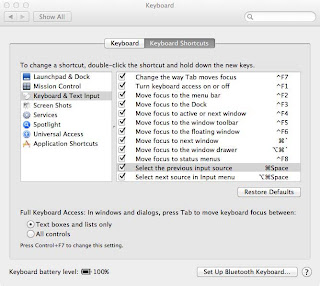 Hope that would be understand, if you got anything to say please leave comments and would be appreciate... :)
ps: ယူနီကုတ်လက်ကွက်ကို နောက်ပိုစ့်မှာတင်ပေးပါဦးမယ်... ကျွန်တော်လည်း လက်ကွက်သိပ်မရသေးပါ ;)
***
KoZero
If you want to change Myanmar Unicode Keyboard Layout in Mac OS X Lion, Please follow below steps...
Step1. Go to System Preferences from Apple icon

Step2. Click Language and Text
✔ Tick the check mark Keyboard & Character View to view keyboard layouts

Step3. Click Input Sources
✔ Tick the check mark to Myanmar -QWERTY
 Step4. For Keyboard shortcut (command+space bar) for switching between English & Myanmar Qwerty Keyboard layout
✔ Tick the check mark Select the previous input source
 Hope that would be understand, if you got anything to say please leave comments and would be appreciate... :)
ps: ယူနီကုတ်လက်ကွက်ကို နောက်ပိုစ့်မှာတင်ပေးပါဦးမယ်... ကျွန်တော်လည်း လက်ကွက်သိပ်မရသေးပါ ;)
***
KoZero
Thursday, July 21, 2011
Redeem OS X Lion FREE if you purchased after 6 Jun 2011

Finally, OS X Lion is released, if you purchased your Mac between June 6, 2011 and July 20, 2011 you can free upgrade using "OS X Lion Up to Date Program"
Click here to Redeem from the Apple Online Store>>>
Subscribe to:
Posts (Atom)